
SafePal is thrilled to announce its official integration with XYSwap, a cross-chain liquidity aggregator, bringing native TRX staking directly to the SafePal wallet ecosystem. Through this integration, non-custodial TRX staking on SafePal is now live on both the SafePal mobile app and the SafePal S1 and X1 hardware wallet line.
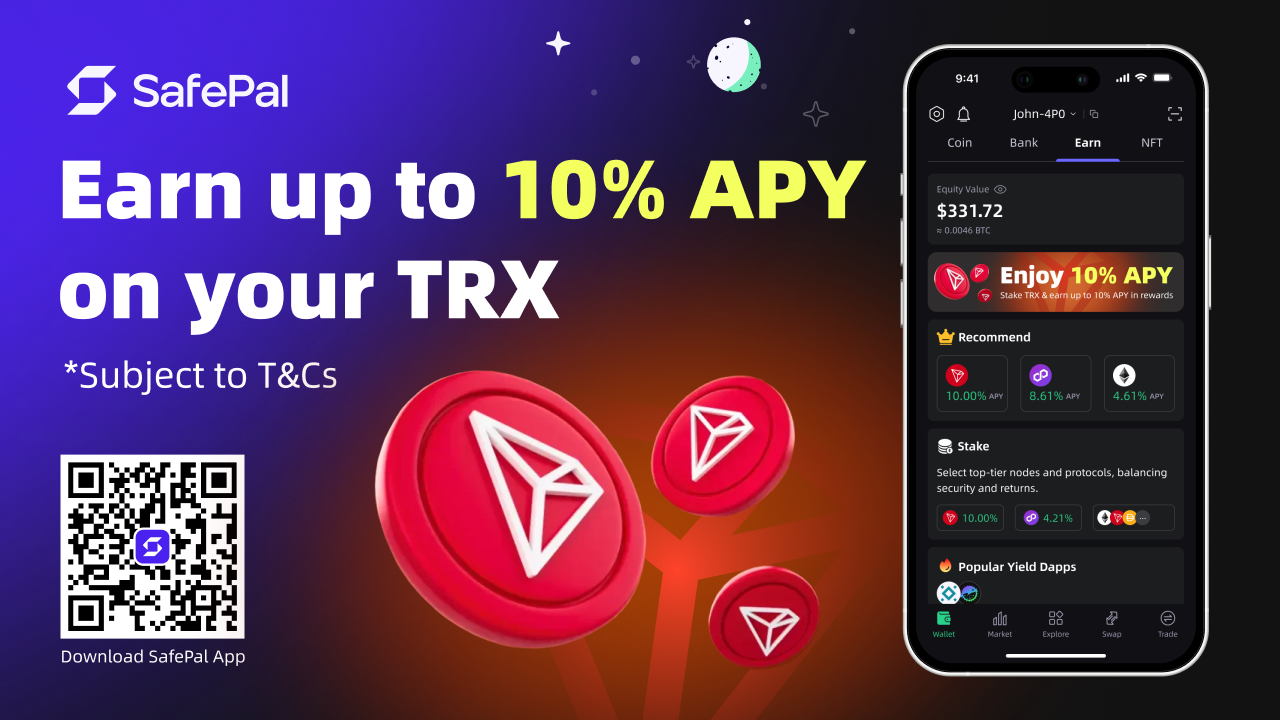
Stake TRX and earn up to ~10% APY on TRX holdings, with no lock-up periods, no third-party dApps, and full non-custodial control over their assets.
The TRX staking product is built on TRON Stake 2.0, the TRON blockchain’s native staking protocol. Yield compounds automatically on every interaction, you can add to your stake at any time (minimum of 1 TRX per deposit), and submit an unstaking request (with a 15 day withdrawal queue).
Whether you use the SafePal app on iOS or Android, or manage assets through the SafePal S1 and X1 hardware wallet line, the full TRX staking experience is available to you in one place. To get started, download/update the SafePal mobile app and follow the staking guide.
What Is TRX? TRON’s Native Cryptocurrency Explained
TRX is the native cryptocurrency of the TRON blockchain (one of the most widely used blockchains in the world). Launched in 2017 by the TRON Foundation, TRX powers the full range of activity on the TRON network: from paying transaction fees and accessing decentralised applications (dApps) to participating in network governance and earning staking rewards.
The TRON blockchain was designed for high-throughput, low-cost digital content and financial transactions. It is best known today as the dominant network for USDT-TRC20 and one of the widely transferred stablecoins in the world. Every USDT-TRC20 transfer, every DeFi interaction, and every smart contract call on TRON consumes Energy, which is generated by staking TRX.
What Is TRX Used For?
TRX has several core use cases within the TRON ecosystem:
- Transaction fees: TRX is the gas token of the TRON network. Users who do not stake TRX to generate free Energy or Bandwidth burn TRX directly to pay for transactions.
- Governance: TRX holders can stake their tokens to receive votes, which are used to elect TRON’s 27 Super Representatives (SR) and the validator nodes that produce blocks and govern the network.
- Staking rewards: By staking TRX under TRON Stake 2.0, holders earn a share of block rewards distributed by Super Representatives, plus income from renting out the Energy their staked TRX generates.
- DeFi and dApps: TRX is the primary currency across TRON’s DeFi ecosystem, including lending protocols, decentralised exchanges, and yield products.
- USDT-TRC20 infrastructure: Because every USDT-TRC20 transfer consumes TRON Energy, the TRX staking and energy rental economy is directly underpinned by stablecoin demand on the network.
TRX and staking: Staking TRX is one of the most direct ways to put TRX to work and earn TRX rewards. Rather than holding TRX passively, stakers contribute Energy and voting power to the TRON network and earn compounding yield in return. The TRX staking product makes this accessible without leaving your SafePal wallet.
What Is TRX Staking?
TRX staking is the process of pledging your TRX tokens on the TRON blockchain to earn rewards. Under TRON Stake 2.0 (TRON’s current staking protocol), staked TRX generates two types of yield: income from TRON Super Representative (SR) voting rewards, and income from renting out the Energy your staked TRX generates.
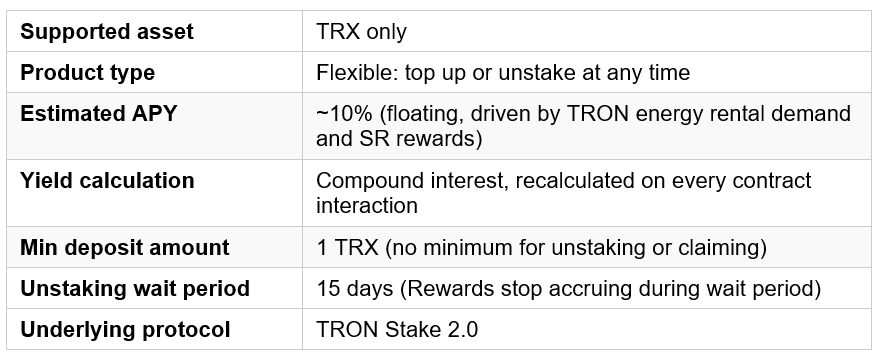
SafePal’s TRX staking is a flexible staking product, meaning there is no mandatory lock-up period for depositing funds. You can top up your stake at any time and submit an unstaking request whenever you choose, with the only waiting period being the 15-day unstaking cooldown (14 days enforced by the TRON Stake 2.0 protocol itself with an additional 1 day buffer).
Once you submit an unstaking request, it cannot be cancelled.
TRX Staking APY: ~10% and How Compound Rewards Are Calculated
SafePal’s TRX staking currently offers an estimated ~10% annual percentage yield (APY). This is a floating TRX staking APY and moves with real-time supply and demand in the TRON energy rental market and with Super Representative voting reward rates. It is not a fixed or guaranteed return.
How TRX Staking Rewards Compound
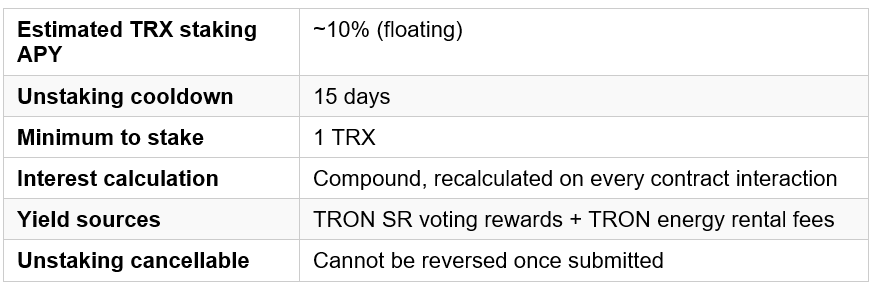
SafePal’s TRX staking uses compound interest. Each time you interact with the staking contract (i.e. deposit, top up, or unstake), the protocol recalculates your accumulated TRX staking rewards up to that point and folds them into your principal. This means your TRX rewards automatically earn further rewards, with no manual reinvestment required.
- When you top up your TRX stake: the additional TRX begins earning from the moment of deposit and joins the compound calculation alongside your existing balance.
- When you submit an unstaking request: that portion of your staked TRX stops earning rewards upon commencement of the 15-day waiting period. Interest stops only once you complete the withdrawal.
Example: 1,000 TRX staked at ~10% APY grows to approximately 1,100 TRX after one year through compounding alone with no manual action needed. The more often you interact with the contract, the more precisely your TRX staking rewards compound.
TRX Staking Yield Sources: TRON SR Rewards and Energy Rental Income
The TRX staking yield distributed by SafePal comes from two distinct income streams, both rooted in genuine TRON network activity.
Source 1: TRON Super Representative Voting Rewards
Staking TRX under TRON Stake 2.0 generates voting power on the TRON blockchain. SafePal uses this accumulated voting power to vote for TRON Super Representatives (SRs), which are the elected validators who produce blocks and govern the TRON network. In return for votes, SRs distribute a share of their block rewards back to voters in TRX. These SR voting rewards form one component of the TRX staking yield SafePal distributes to stakers.
Source 2: TRON Energy Rental Income
Staked TRX also generates TRON Energy (the resource consumed by every smart contract interaction on the TRON blockchain, including USDT-TRC20 transfers). Rather than burning TRX to cover energy costs themselves, many TRON users and protocols rent energy from a pool. The staked TRX via the XYSwap integration contributes to this rental pool, and renters pay TRX to access the Energy. That TRON energy rental income forms the second component of the TRX staking yield returned to stakers.
Energy rental demand is structurally high because TRON processes a high volume of USDT-TRC20 transactions, creating consistent, around-the-clock demand for rented Energy from traders, remittance users, DeFi protocols, and exchanges.
How TRX staking yield flows: Your staked TRX generates voting power (SR rewards) + Energy (rental income). Both income streams are pooled and distributed back to you as compounding TRX staking rewards (~10% APY).
Yield-only product: TRX staking through the XYSwap integration is yield-only. The Energy, Bandwidth, and voting power generated by TRON Stake 2.0 are used internally to produce the TRX yield and are not passed to stakers as individual on-chain rights or resources.
SafePal x XYSwap Native TRX Staking: Mobile App and S1/X1 Hardware Wallet
The new TRX staking integration for XYSwap and is available on both the SafePal mobile app and hardware wallet line. This removes the inconvenience of navigating to an external dApp and trusting an unfamiliar contract, removing unnecessary friction and risk.
The entire TRX staking cycle of depositing, topping up, monitoring rewards, unstaking, and withdrawing is managed inside SafePal mobile app interface without the need for external browsers and copy-pasting of contract addresses. The experience is equally smooth whether you’re using SafePal on your phone or signing transactions with SafePal S1 or X1 hardware wallets
TRX Staking on the SafePal Mobile App
The SafePal mobile app brings TRX staking with a purpose-built staking interface. Open the SafePal app, navigate to the wallet tab at the bottom, followed by the Earn tab on top, and select the TRX staking option, enter the desired amount (a minimum of 1 TRX is required) and confirm.
The mobile app is the fastest way to stake TRX, top up an existing position, or initiate an unstaking request. Your staking dashboard updates in real time, showing your current position, accumulated rewards, and compound interest as it builds.

TRX Staking with the SafePal Hardware Wallet Line
TRX staking is fully supported on the SafePal S1 and X1 hardware wallet lines, making it one of the few ways to stake TRX with a hardware wallet without relying on a centralized platform or browser extension.
For every TRX staking or unstaking transaction initiated through the SafePal app for a hardware wallet address, physical confirmation is required on the device. This means even if your connected phone is compromised, no staking action can execute without you pressing a button on the hardware wallet.
For users who hold significant TRX and want the highest possible security standard, this is the recommended way to stake. Your private keys never leave the device and remain offline and encrypted in the secure element chipset in the hardware wallets..
How to Stake TRX on the SafePal Mobile App: Step-by-Step Guide
Staking TRX on the SafePal mobile app takes under two minutes on iOS or Android. Follow these steps to start earning TRX staking rewards:
- Update the SafePal app to the latest version: TRX staking is rolling out this week. Update via the App Store or Google Play to unlock the Stake feature.
- Open your wallet in the SafePal app: Open the SafePal app, navigate to the wallet tab at the bottom, followed by the Earn tab on top, and select the XYSwap TRX staking option
- Enter the TRX amount you want to stake: The minimum TRX staking amount is 1 TRX for each deposit. There is no maximum.
- Confirm the staking transaction: The transaction is signed locally on your device. A small TRON network gas fee applies, deducted from your TRX balance.
- Monitor your TRX staking rewards in real time: Your staking dashboard shows your current position and accumulated compound rewards, updated on every contract interaction. Top up at any time by repeating from step 2.
How to Stake TRX with the SafePal S1 and X1 Hardware Wallet Line
The SafePal S1 and X1 hardware wallet works together with the SafePal mobile app. TRX staking transactions are initiated in the app, then signed and confirmed physically on the hardware wallet device with your private keys remaining offline and encrypted in the secure element chipset.. Here is how to stake TRX using the hardware wallet:
- Connect your SafePal hardware wallet to the SafePal mobile app: Open the app and ensure your hardware wallet is paired and detected. Update the app and S1 and X1 firmware to the latest version.
- Select your TRX wallet in the SafePal app: Navigate to the TRX asset page. The Stake button appears alongside Send and Receive.
- Enter the TRX amount you want to stake: The minimum TRX staking amount is 1 TRX. There is no maximum.
- Review the transaction details in the SafePal app, then confirm on the hardware wallet: The app displays the staking transaction for your review. When ready, the S1 or X1 hardware wallet will prompt you to physically confirm. Press the confirm button on the device to sign the transaction.
- The staking transaction broadcasts to TRON: Your S1 or X1 signs the transaction in its secure element and broadcasts it to the TRON blockchain. TRX staking rewards begin compounding immediately.
- S1 and X1 security advantage: Every TRX staking, top-up, and unstaking transaction must be physically approved on the S1 or X1 device. No staking action can be executed remotely, even if your connected phone is fully compromised, making the S1 and X1 hardware wallets a more secure way to stake TRX.
How to Unstake TRX on SafePal: The 15-Day Process Explained
Unstaking TRX on SafePal follows TRON Stake 2.0 rules, which divide the unstaking process into two sequential stages. Understanding this before you stake TRX is important.
Stage 1: Submit Your TRX Unstaking Request
You can submit a TRX unstaking request at any time from within the SafePal app. The minimum unstaking amount is 1 TRX.
Important: Unstaking cannot be cancelled once executed. Once a TRX unstaking request is submitted, it cannot be reversed. This is a TRON Stake 2.0 protocol constraint, not a SafePal restriction. Confirm you are ready before proceeding.
Stage 2: 15-Day Waiting Period and Withdrawal
After submitting, your TRX unstaking enters a mandatory 15-day waiting period. This applies across the TRON network to all stakers, regardless of wallet or platform.
Your TRX will cease to compound staking interest upong commencement of the15-day waiting period. The unstaking cannot be cancelled , and stakers will be able to claim completion of the 15 day waiting period. Your TRX (original principal plus all accumulated staking rewards) returns to your SafePal wallet balance.
Frequently Asked Questions
What is TRX?
TRX is the native cryptocurrency of the TRON blockchain. It is used to pay for TRON transactions, vote for Super Representatives in TRON governance, access DeFi applications, and generate Energy and Bandwidth resources through staking.
TRX is also the token underlying USDT-TRC20 infrastructure. As every USDT transfer on TRON consumes Energy, demand for TRX staking is structurally tied to stablecoin activity on the network.
What is TRON Stake 2.0?
TRON Stake 2.0 is the current staking mechanism on the TRON blockchain. It allows TRX holders to lock their tokens to generate TRON Energy and Bandwidth resources, earn voting power to elect Super Representatives, and receive staking rewards. SafePal’s TRX staking product is built on TRON Stake 2.0.
How do I stake TRX on the SafePal mobile app?
Open the SafePal mobile app on iOS or Android, navigate to the wallet tab at the bottom, followed by the Earn tab on top, and select the TRX staking option and enter your amount (minimum 1 TRX), and confirm.
TRX staking rewards begin compounding immediately. The full process takes under two minutes.
Can I stake TRX with the SafePal S1 or X1 hardware wallet?
Yes. TRX staking on SafePal is fully supported on the SafePal S1 hardware wallet. Staking and unstaking transactions are initiated through the SafePal mobile app and then confirmed physically on the S1 or X1 device. Your private keys never leave the hardware wallet, and no staking transaction can execute without physical approval on the S1 or X1 hardware wallets, making it a more secure way to stake TRX.
What is the TRX staking APY on SafePal?
SafePal’s TRX staking currently offers approximately 10% APY. This is a floating TRX staking APY and varies based on TRON energy rental demand and Super Representative voting reward rates. It is not a fixed or guaranteed return.
How are TRX staking rewards calculated?
TRX staking rewards on SafePal use compound interest. Each time you interact with the staking contract to deposit, top up, or unstake, the system recalculates your accumulated rewards and folds them into your principal for the next period.
Your TRX staking rewards earn further rewards automatically, with no manual reinvestment needed.
Where does TRX staking yield come from?
TRX staking yield from the XYSwap integration comes from two sources:
TRON Super Representative voting rewards: Voting for TRON SRs using the voting power generated by staked TRX, and block rewards are passed back to stakers.
TRON energy rental income: Staked TRX generates Energy that is rented to TRON users and protocols for USDT-TRC20 transfers and DeFi interactions, generating TRX rental fees that flow to stakers.
How long does it take to unstake TRX for the XYSwap integration?
Unstaking TRX takes 15 days. After submitting an unstaking request, TRON Stake 2.0 enforces a 14-day waiting period, with an additional 1 day buffer for the XYSwap staking feature before funds can be withdrawn. After 15 days, stakers can complete the withdrawal and claim the staked TRX and rewards to their wallets.
Can I cancel a TRX unstaking request on SafePal?
No. Once a TRX unstaking request is submitted, it cannot be cancelled or reversed. This is a TRON Stake 2.0 protocol constraint and not a SafePal restriction. Ensure you are ready to proceed before confirming an unstaking request.
Does TRX earn staking interest during the 15-day unstaking wait?
No. TRX in the 15-day unstaking waiting period stops compounding staking interest.
Is TRX staking from the SafePal and XYSwap integration safe?
Yes. TRX staking is fully non-custodial on both the SafePal mobile app and the SafePal S1 or X1 hardware wallet. Your private keys never leave your device. On the mobile app, all transactions are signed locally on your phone before reaching TRON.
With the hardware wallets, every TRX staking transaction requires physical confirmation on the respective devices, meaning no staking action can execute even if your connected phone is compromised.
What is the minimum amount of TRX I need to stake?
The minimum TRX staking amount on SafePal is 1 TRX. This applies to initial deposits, top-ups, and unstaking requests. There is no maximum staking limit.
Are there fees for TRX staking on SafePal for the XWSwap integration?
SafePal does not charge a commission on TRX staking rewards. Standard TRON network gas fees apply when you initiate on-chain transactions (i.e. staking, topping up, or unstaking). These fees are paid in TRX from your wallet and are set by the TRON network, not by SafePal.
Do I receive TRON Energy or voting rights when I stake TRX on SafePal?
No. The TRX staking feature is a yield-only product. The Energy, Bandwidth, and voting power generated by TRON Stake 2.0 are used internally to produce the TRX staking yield and governance rights are not passed to individual stakers.
Start Staking TRX on SafePal App and Hardware Wallet
TRX staking on SafePal is live on the SafePal mobile app and the SafePal S1 and X1 hardware wallet.
Deposit your TRX and start earning up to ~10% APY through TRON energy rental and SR voting rewards compounding automatically, in full self-custody.
Explore the SafePal S1and X1 Hardware Wallet →
SafePal will continue integrating providers for more chains and assets into the wallet suite, so users can grow their crypto portfolio and maximize capital efficiency. without leaving SafePal or compromising on self-custody.
About SafePal:
Founded in 2018, SafePal is a next generation non-custodial crypto wallet suite backed by Animoca Brands, Binance and Superscrypt. The suite empowers access to decentralized and centralized finance on 200+ blockchains across its hardware, software, and browser extension wallet solutions.
Encompassing a diverse mix of crypto asset management solutions like cross-chain swapping, trading and yielding tools, centralized exchange (CEX) mini programs, a banking gateway and Mastercard for users — SafePal serves 30 million users globally across 200+ regions and countries in 16 languages.
SFP is a decentralized BEP-20 and ERC-20 token fuelling the SafePal ecosystem with various utilities such as discounts on SafePal products, staking boost and airdrop rewards, seamless conversion to gas tokens, and more.
Stay informed about SafePal →
Full Disclaimer:
The ~10% APY figure is a floating estimate based on current TRON network conditions including TRON energy rental demand and Super Representative voting reward rates. It is subject to change without notice and is not a fixed or guaranteed return.
The XYSwap staking product is built on TRON Stake 2.0. The mandatory 15-day unstaking waiting period applies and cannot be waived.
Not Investment Advice
The information above does not constitute investment advice, financial advice, trading advice, or any other sort of advice and you should not treat any of the article’s content as such. SafePal does not recommend that any cryptocurrency should be bought, sold, or held by you.
Cryptocurrency investment is subject to high market risks. Please invest cautiously. SafePal will not be responsible for any investment losses. SafePal will not be liable whatsoever for any direct or consequential loss arising from the participation of its activities.
Do conduct your own due diligence and consult your financial advisor before making any investment decisions.
Non-Endorsement
The appearance of a third party on SafePal and its activities does not constitute an endorsement, guarantee, warranty, or recommendation by SafePal.
Do conduct your own due diligence before deciding to invest in any third-party projects or use any third-party services.